Remote for Smart Samsung TV
- 4.2
- Rating
- 10.00M
- Installs
- Free
- Price
 Analysis by App-foxy
I tested Remote for Smart Samsung TV as the kind of utility you keep nearby when the physical remote has disappeared under a cushion, been left in another room, or simply stopped cooperating. It is a free House & Home app from BoostVision, built for controlling Samsung SmartThings televisions from a compatible mobile device. My overall impression is positive: it is straightforward, quick to understand, and especially handy in a shared living room where several people use the same screen.
The important distinction is that this is not a television streaming service or a replacement for every television accessory. Its job is narrower and more practical: put the everyday remote controls on your phone. That makes it useful when convenience matters more than having a separate handset in your hand. It also means your experience depends on the phone, the TV, and the way your home network is arranged.
How it works in a shared living room
The most convincing use case is an ordinary household evening. One person is watching television, another wants to lower the volume, and the physical remote is nowhere to be found. Instead of searching through blankets or asking who last used it, I can reach for a phone and use the app. That small change is more valuable than it sounds because a phone is usually easier to locate than a remote control.
You May Also Like

 AccuWeather: Weather Radar
AccuWeather Review: A Quick, Clear Forecast for Everyday Decisions
For everyday plans, the best forecast is the one you can understand quickly. AccuWeather makes rain timing, radar, and local conditions easy to act on, with a few trade-offs.

 Hill Climb Racing
Why Hill Climb Racing Still Turns Crashes Into One More Run
A tiny car, a bumpy hill and one more upgrade: Hill Climb Racing keeps resurfacing because its simple chaos makes every near-miss feel personal.

 AliExpress - Shopping App
AliExpress Makes Global Shopping Feel Personal, but Shoppers Bear the Risk
AliExpress turns a global marketplace into a pocket-sized discovery engine. Its reach is useful, its shopping loop compelling, and its trade-offs easy to miss.

 Lords Mobile: Kingdom Wars
Lords Mobile Is a Kingdom-Building Routine, Not a Quick Match
A case-by-case verdict on the building, battles, device demands, and social commitments that make Lords Mobile rewarding for some players and exhausting for others.

 PDF Scanner app - TapScanner
TapScanner Makes Paperwork Easier to Capture, Check, and Share
TapScanner makes scanning with a phone feel less like a rescue operation and more like a dependable step in getting work done. Its capture tools are useful, though not flawless.

 Block Blast!
Block Blast! Shows How Much a Puzzle Game Can Leave Out
A quiet grid game shows why puzzle players increasingly value instant clarity, repeatable skill and low-pressure play—and where the genre still needs to catch up.
More From Our News Desk
View All News


Shared-device use also changes how I judge a remote app. It should not assume that one person owns the television or that the same phone will always be available. In practice, different household members may take turns controlling the screen. A phone can be passed around, but that is not always ideal: the person holding control also has the ability to interrupt playback, change channels, adjust sound, or switch inputs. The app is convenient, but convenience should be balanced with ordinary household trust.
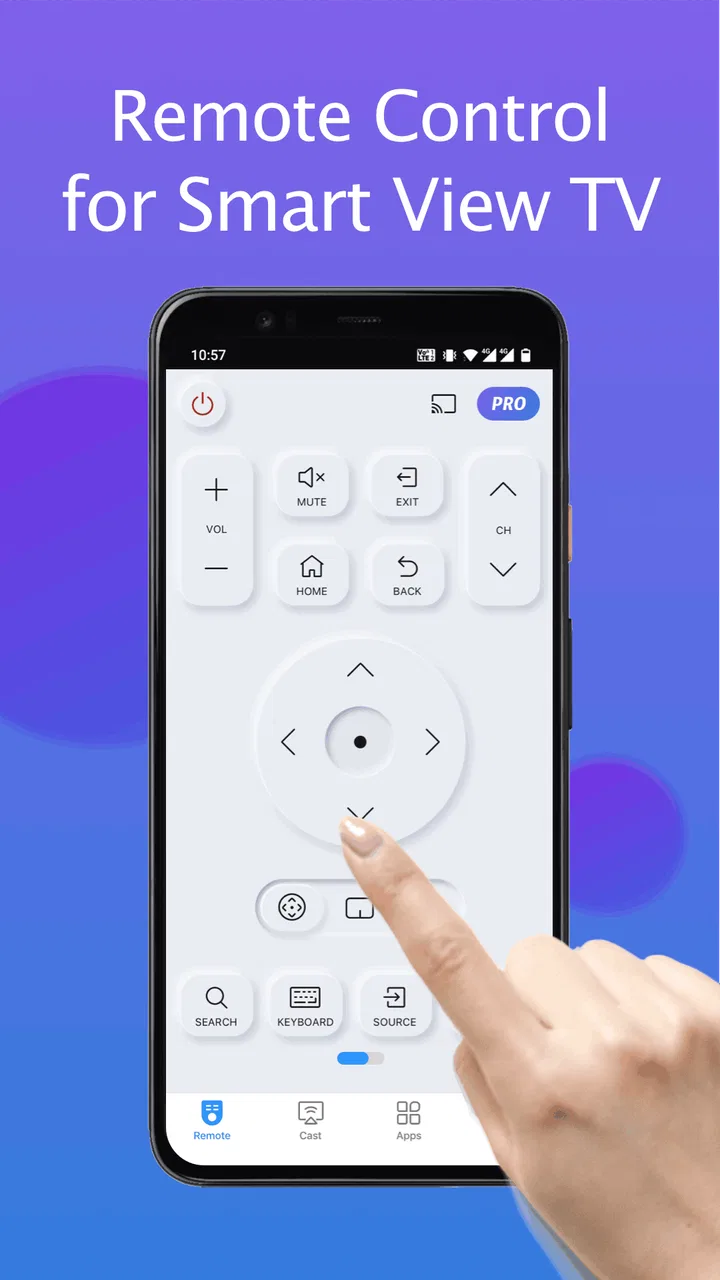
I found the layout most useful for simple actions rather than extended browsing. Turning the television on or off, changing volume, navigating menus, and moving through content are the tasks that make a phone-based remote feel worthwhile. The phone screen is also easier to illuminate than a lost remote in a dark room, although using a touchscreen without physical buttons removes the tactile feedback some people rely on.
That trade-off is central. A traditional Samsung remote gives me buttons I can find by touch without looking down. This app gives me a remote that is much harder to lose permanently because it lives on a device I already carry. If someone in your home often misplaces the handset, the app is a sensible backup. If everyone prefers pressing real buttons from memory, it may feel less natural.
What makes the phone approach useful
A phone remote is particularly practical for a television mounted on a wall or placed in a room where the original handset is shared with several devices. I do not need to remember which remote belongs to which screen before trying the controls. The phone interface makes the purpose clear, which helps guests and occasional users who are unfamiliar with the television setup.
There is another subtle benefit in a busy home: the television remote does not have to remain in one central location. A household member can use the app from the sofa, kitchen doorway, or another nearby spot, provided the connection conditions are suitable. That makes quick adjustments less disruptive than walking across the room or taking the physical remote away from the current viewer.
Still, I would not treat the app as a guaranteed substitute for a physical remote in every situation. If the phone battery is empty, the phone is being used by someone else, or the television and mobile device are not communicating properly, the convenience disappears. My advice is to view it as a strong backup and a useful everyday option, not as the only control method in a home that depends heavily on the television.
Setup, device boundaries, and first-use expectations
The app is aimed at Samsung SmartThings TVs, so the first question is compatibility with the television in your room. The store summary presents it as a remote for Samsung SmartThings televisions, not as a universal controller for every television brand. I would therefore check the exact TV family before relying on it, especially if your home contains older Samsung equipment alongside newer smart models.
Setup should be approached with the phone and television treated as two separate devices that need to recognize each other. On a household network, the phone may discover the television more smoothly when both are connected to the same local network. If the TV does not appear immediately, I would first check that both devices are active, that the correct television is selected, and that the phone is not connected through a different network path such as mobile data or a guest network.
This is one of the less obvious boundaries of a phone remote: the app cannot make a television compatible simply because the television has the Samsung name on it. Smart features, network arrangement, and model generation all matter. If you have several Samsung televisions nearby, take extra care during setup so you do not accidentally control the wrong screen. A short test with the volume or navigation control is safer than assuming the first discovered device is the intended one.
Households should also decide who is allowed to set up the app. The person performing the initial connection effectively establishes the working relationship between that phone and the television. I would avoid setting it up casually on a visitor’s phone unless everyone is comfortable with that person having control later. This is not a parental-control system or a household account manager; it is a remote-control tool, so the boundaries come from the people using it and from the devices they choose to connect.
The app is free to install, which lowers the barrier to trying it. It includes in-app purchases ranging from $1.99 to $36.99 per item, so I would pay attention to any purchase screen and decide whether the free experience already covers your needs before spending money. For a simple backup remote, I would begin with the basic functions and only consider an optional purchase if it solves a specific problem I actually encounter.
Its current version is 1.7.2, and the app supports Android starting with version 7.0. That makes it accessible on many older Android phones, although compatibility with the television remains just as important as the phone’s operating system. The age rating is Everyone, which fits a household utility that does not depend on mature content. That rating does not mean every child should be given unrestricted control of the family television, though; that decision still belongs to the adults in the home.
Keeping control organized between people
When several people use the same TV, the smoothest arrangement is to agree on a primary phone and treat other phones as backup controllers. That avoids a confusing situation where multiple people are trying to change the same program at once. I would also tell occasional users which television the app is paired with and ask them to test a harmless action before changing inputs or turning the screen off.
This coordination matters more in shared homes than in private bedrooms. A remote app can make control more available, but it can also make interruptions easier. Someone in another part of the home may be able to alter the viewing experience without physically picking up the remote. That is not a flaw unique to this app; it is a consequence of moving control onto connected personal devices. Clear household expectations are more effective than assuming the technology will manage those boundaries for you.
For children, the Everyone rating makes the app approachable, but I would still introduce it as a tool rather than a toy. A child who understands volume and navigation can use it responsibly, while a younger child may accidentally switch away from a program or change settings. Since the app is a remote, not a content filter, it should not be mistaken for a way to supervise what appears on the television.
Everyday strengths and the friction I noticed
The strongest part of the experience is immediacy. When the connection is working, I can reach the controls without searching for a separate object. That is valuable for quick changes: lowering sound while someone is on a call, pausing a program while answering the door, or navigating a menu when the original remote is in another room.
The app also suits homes where the physical remote is shared too aggressively. If one person keeps taking it to another room, a phone-based alternative gives others a second route to the television. I would especially recommend trying it in a living room with frequent visitors, provided the household is comfortable with guests using their own phones as controllers.
The main friction comes from the fact that a touchscreen is not a physical control surface. I sometimes need to look at the phone to find the right button, whereas a familiar remote can be operated by feel. This difference becomes more noticeable during fast navigation or in a dark room. People with limited dexterity may also prefer the spacing and feedback of a conventional handset.
Another practical limitation is dependence on the phone itself. Notifications, calls, low battery, screen locking, and the simple fact that somebody else is holding the device can all interrupt the remote experience. If the television is central to your daily routine, keeping one dependable physical remote available remains sensible. The app is excellent at reducing inconvenience, but it cannot remove every point of failure in a connected setup.
I also recommend being patient during the first connection rather than repeatedly tapping controls. If the TV has not been selected correctly, repeated commands can produce confusing results once the connection catches up. Select the intended screen, wait for the interface to respond, and test one basic command. That small habit is more useful than treating the app like a button that must react instantly to every tap.
Who should use it, and who should skip it
I think this app is a good fit for Samsung SmartThings TV owners who frequently lose the physical remote, want a convenient backup, or share a television among several people. It is also a reasonable choice for someone moving into a home where the original remote is missing and a phone is available for initial control.
I would be more cautious about recommending it to someone who expects a universal remote for mixed-brand equipment. The app is specifically centered on Samsung SmartThings televisions, so it is not the answer for controlling a collection of unrelated screens. I would also steer away from making it the sole solution for an older family member who depends on tactile buttons, unless that person is comfortable with touchscreen controls.
It may not suit homes with strict device boundaries, either. If children or visitors should never have access to television controls from their own phones, the household may prefer to keep a physical remote in a controlled location. The app does not replace a family agreement about who may operate the screen, when they may do so, or what settings they are allowed to change.
Compared with the usual alternative, the original Samsung remote, this app wins on availability and portability. The physical remote wins on tactile feedback, independence from a phone battery, and simple one-person control. Compared with a general universal-remote app, this focused approach should be easier to understand when the target is a compatible Samsung SmartThings TV, but it is less appropriate if you need one controller for many brands and devices.
My household verdict
BoostVision has made a practical utility for a very recognizable problem. With more than 10 million installs and an average rating of 4.3 from around 120 thousand ratings, it has clearly found an audience among people who want their phone to fill the gap left by a missing or inconvenient television remote. Those figures do not guarantee a perfect connection in every home, but they do suggest that the basic idea is useful to many Samsung TV owners.
I like the app most when I treat it as a shared-home convenience rather than a complete replacement for every remote. It is fast to reach, easy to explain to a guest, and useful for those small moments when walking across the room feels ridiculous. The best workflow is to set it up on a trusted device, confirm the correct television, agree on who may use it, and keep the original remote available for emergencies or for people who prefer buttons.
The free starting point makes trying it straightforward, while the optional purchases mean I would review each prompt carefully instead of assuming extra spending is necessary. For a household with a compatible Samsung SmartThings TV, I would recommend giving it a test during a normal evening rather than judging it only from setup. Try a volume change, menu navigation, and a power action, then see whether the phone-based controls fit the way your family actually shares the screen.
My final recommendation is positive but specific: choose Remote for Smart Samsung TV if you want a convenient Samsung television controller on Android and you are comfortable managing shared access yourselves. Skip it if you need a universal remote, depend on physical button feedback, or require built-in family restrictions. For the right living room, it is a useful little backup that can quietly become the remote everyone reaches for first.
FAQs for Remote for Smart Samsung TV
01How do I set up the Remote for Smart Samsung TV app?
Setting up the Remote for Smart Samsung TV app is straightforward. First, ensure your smartphone and Samsung TV are connected to the same Wi-Fi network. Open the app, and it will automatically search for compatible TVs nearby. Select your TV, and follow any on-screen instructions to complete the pairing process.
02Is the Remote for Smart Samsung TV app compatible with all Samsung TV models?
The Remote for Smart Samsung TV app is compatible with most Samsung Smart TV models from 2010 onwards. However, compatibility may vary based on the specific features of your TV model and software version. It’s recommended to check the app’s compatibility list or contact support for specific model queries.
03Are there any costs associated with using the Remote for Smart Samsung TV app?
The app is generally free to download with basic remote functionalities. However, it may offer in-app purchases or premium features for enhanced capabilities. These could include advanced control options, ad-free experience, or customizations. Always review the app’s pricing details in the app store before downloading.
04What features does the Remote for Smart Samsung TV app offer?
The app provides a range of convenient features, including basic remote controls such as volume and channel adjustment, a keyboard for easier text input, and quick access to apps on your TV. Some versions may also offer voice control and customizable remote layouts for a more personalized experience.
05What should I do if the Remote for Smart Samsung TV app isn’t working?
If the app isn’t functioning correctly, first ensure that your smartphone and TV are on the same Wi-Fi network. Restart both devices and try reconnecting. Check for any available updates for the app or your TV’s software. If issues persist, contacting the app’s support team for troubleshooting advice is recommended.
Pros
- Easy setup with quick pairing.
- Supports multiple Samsung TV models.
- Offers intuitive navigation controls.
- Customizable remote interface.
- Responsive customer support.
Cons
- Limited to Samsung TVs only.
- In-app ads can be intrusive.
- Requires stable Wi-Fi connection.
- Some features need premium upgrade.
- Occasional connectivity issues.

Remote for Smart Samsung TV
Gallery